External NFC (Proximity sensor) for Windows Store Apps
From the archive — written in 2013 for the original WordPress version of this site. Expect dated tech and dead links.
If you are looking for a way to add NFC support to your windows store applications then you have two options. The first is make sure you buy your hardware with an in built proximity sensor. This option is quite a layout of cash if you already have a desktop/laptop etc that you do your development on.
The second option is to purchase an external NFC card reader. For this your options are limited because of Windows 8 driver support. There is one however that was found by both Peter Footand Craig Hawker this is the FeliCa RC-S380 compact USB NFC reader and it is available in the UK from NFC Stuff at £88.68 (delivered).
If you do purchase this reader you will find that it does not install the drivers when you plug it in. to rectify this you will need to download and install the NFC Port Software from here: http://blog.felicalauncher.com/en/?p=594
Once installed you will see the sensor listed within the proximity devices list in device manager:
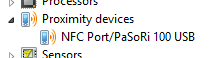
That’s it you now have a machine that will allow you to develop NFC enabled Windows Store applications.
Here is a couple of links to help you on your way…
http://blogs.msdn.com/b/windowsappdev/archive/2013/04/18/develop-a-cutting-edge-app-with-nfc.aspx
http://www.silverlightshow.net/items/Near-Field-Communication-in-windows-8-part-1.aspx
Thanks once again to Peter for helping me out.